# Horizontal Scaling with replicas
### About replicas
Replicas are used for horizontal scaling and allow you to connect multiple resources in parallel to your application. Your application will be able to handle more requests in parallel this way.
Arkane Cloud's replicas can be added to any always-on workspace with just a few clicks. You can add up to 10 replicas (& more in our enterprise tier) to your workspaces. Each additional replica costs the same as the workspace's plan. If you set a Micro plan workspace to 4 replicas that will be 4 \* $5 = $20. The default value for replicas is 1 in which case you will only have the 1 main workspace and no additional replicas.
### How replicas work
Each replica has its own computing resources (CPUs & RAM). However, all replicas use the `/home/user/app` as a **shared** filesystem. The allocated SSD storage for your plan is shared between replicas. If you modify that filesystem i.e. via an install step in the pipeline, via the IDE's file editor or the terminal - this change will automatically affect all replicas. Files placed outside the app directory will not be available.
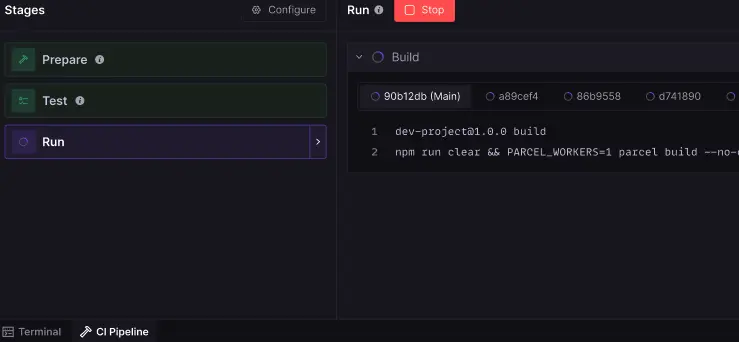
In order to utilize replicas you will need to set up a [CI Pipeline](/docs/getting-started/ci-pipelines.md). The prepare and test stage will only run on the main replica. All replicas can access the same installed packages and builds in the (shared) **/home/user/app** folder. The run stage will be executed on each replica. To see the terminal output select the corresponding replica id in the terminal output window on the right.
### Avoiding conflicting / concurrent writes to the filesystem
The advantage of a shared filesystem is that you do not need to worry about data & file inconsistency.
However there is one caveat to a shared filesystem. You actively need to ensure that replicas are not trying to write into the same file at the same time. One obvious case where this happens is in log files. You want to be able to look at logs on a replica level (i.e. to figure out why one replica is failing and others are not).
Arkane Cloud provides an environment variable `CS_REPLICA` that can be used to identify the respective replica via a unique ID. With this value you can build a logic such that each replica writes their logs into their own file or folder. If you are having trouble setting this up our team is happy to help!
### Environment variables & replicas
Apart from the Arkane Cloud provided replica identifier environment variables you can also set and use environment variables via `Setup/Env Vars`. If you add or modify existing variables you will need to re-run the CI Pipeline's Run Stage in order for all replicas to execute with the changes.
---
# Agent Instructions: Querying This Documentation
If you need additional information that is not directly available in this page, you can query the documentation dynamically by asking a question.
Perform an HTTP GET request on the current page URL with the `ask` query parameter:
```
GET https://docs.arkanecloud.com/docs/getting-started/horizontal-scaling-with-replicas.md?ask=
```
The question should be specific, self-contained, and written in natural language.
The response will contain a direct answer to the question and relevant excerpts and sources from the documentation.
Use this mechanism when the answer is not explicitly present in the current page, you need clarification or additional context, or you want to retrieve related documentation sections.